BlogAI
Why our remote MCP server signs users in with Entra ID, not access tokens
PATs work for an MCP server, but enterprise IT cannot control them. How we let the customer's Entra ID decide who connects, and from which AI client.
For an enterprise, the interesting question about an MCP server is not which tools it offers. It is: who in our organization may use it, from which AI assistant, and how do we switch it off again?
We had to answer that question for time cockpit, our time tracking and project controlling product. Its Web API already works with personal access tokens, and reusing them for the new MCP server was the obvious route. We decided against it. What we built instead took us about four months of calendar time, from the first Entra prototype in May to a setup we could document and test with five AI clients in September. This article explains why we took the longer road, and what it gives the customer’s IT.
The obvious route: reuse the access token
Time cockpit’s Web API authenticates with personal access tokens (PATs). A user creates one, chooses how long it is valid, and with the data scope it carries the same permissions as the user has in the product. For scripts and integrations, that is the right tool.
An MCP server could accept the same token as a bearer token. Whether that works depends on the AI client:
- The developer tools can send one. Claude Code takes it as a header (
--header "Authorization: Bearer …"), Codex reads it from an environment variable (bearer_token_env_var), and VS Code puts it into theheadersof itsmcp.json. - ChatGPT cannot. OpenAI’s Apps SDK documentation states that ChatGPT can not “present custom API keys”; it expects OAuth or no authentication.
- The Claude app supports a fixed token only in beta and for a limited set of organizations. An organization owner enters it once, and Claude then sends the same credential for every member. One person’s PAT would act for the whole organization.
So a PAT would not even reach every assistant our customers use. And where it does, it fails the enterprise on four counts:
- The secret ends up in places IT does not control. A PAT is long-lived and sits in a configuration file or an environment variable on every machine where someone connected an assistant. It carries the user’s full permissions until it expires.
- IT cannot see it in its own tools. Users create PATs on our identity server, outside the customer’s Entra tenant, and nothing records which AI assistant a token has been pasted into.
- IT cannot steer it. The company’s sign-in policies (multi-factor authentication, Conditional Access, compliant devices) do not apply to a token that bypasses the sign-in.
- There is no “which AI client” question at all. A token works from any client that can send it. The company cannot allow Claude Code and refuse another assistant it has not reviewed.
Most of our customers already run Microsoft Entra ID, and their IT departments manage every other application there. The MCP server should be no exception.
Why not let our own identity server do it?
Our identity server already speaks OAuth, issues the tokens our API accepts, and can federate the sign-in to a customer’s Entra tenant. Making it the authorization server of the MCP server looked like the shorter path. It breaks down at client registration.
Every AI client needs a registration, and many of them are customer-specific. An MCP client can only sign in at an authorization server that knows its client ID and redirect URI. Those are often not fixed per product:
- ChatGPT generates a new callback URL for every custom app a workspace creates, and needs a client secret.
- Copilot Studio, according to its documentation, generates one for every tool.
- Codex derives its callback URL from the complete server URL.
With our identity server as the authorization server, every new customer, assistant and server URL would have meant a client that we create and maintain on our side, through a support request. With a product that has many tenants, that was neither possible for us to run nor reasonable to ask customers to wait for.
And every client would have cost money. The license of our identity server is tied to the number of OAuth clients. A client per customer and AI assistant would have turned every new MCP customer into a licensing cost for us. That would have ruled out the MCP server for our smaller customers, and we wanted it to be available to all of them.
The protocol’s self-service options do not fix this.
- Dynamic Client Registration lets any client register itself. The current MCP authorization specification (revision 2026-07-28) deprecates it in favor of Client ID Metadata Documents. Our identity server does not offer it either.
- With Client ID Metadata Documents (CIMD), the client identifies itself by a URL that points to its own metadata. That removes the registration work. It also means any client that publishes such a document can connect, and any allow-list would be ours, not the customer’s.
And the control would sit in the wrong place. The client registrations would live in our system, not in the customer’s tenant. The customer’s Entra ID would only ever see time cockpit signing in, never which AI assistant is behind it.
With the customer’s Entra ID as the authorization server, the registration moves to where it belongs. It is still pre-registration, because Microsoft Entra ID supports neither DCR nor CIMD. Microsoft says so for DCR and, in its own developer blog, for both, and Entra’s metadata advertises neither. But the customer’s administrator does the registration, in their own tenant, without waiting for us. Our identity server keeps the job it is good at: deciding who that user is in time cockpit.
The target picture: two authorities
We split the job between two systems that each already own part of it.
- The customer’s Entra ID decides access: who may sign in, through which AI client, under which policies.
- Our own identity server stays the authority for the product: which time cockpit tenant and user that person is, and therefore what they may see and do.
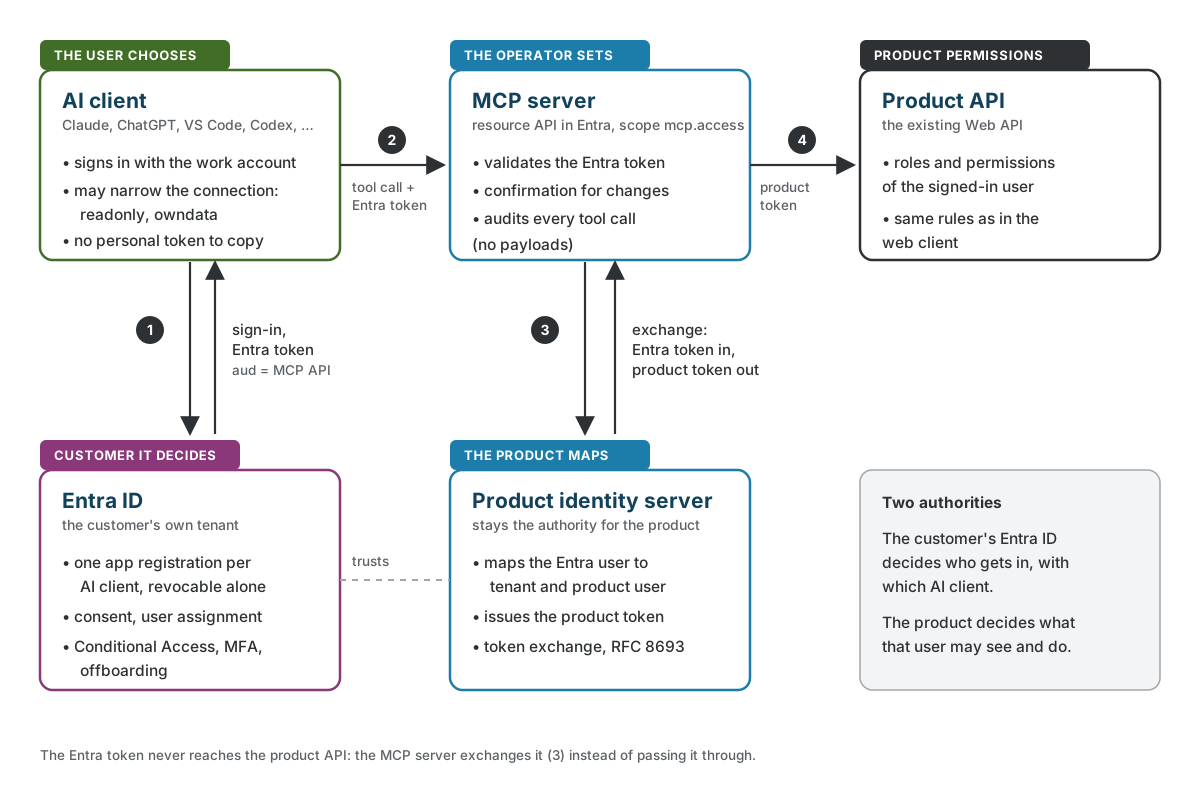
A tool call goes through four steps:
- The AI client signs the user in at the customer’s Entra tenant and receives an access token for our MCP server. The user signs in with their work account; nobody copies a personal credential.
- The client calls the MCP server with that token.
- The MCP server validates the token. Then it exchanges the token at our identity server for a time cockpit token for the same user, using the standard token exchange grant (RFC 8693). Our identity server maps the Entra user to a time cockpit tenant and user. That mapping already existed: customers could sign in to time cockpit itself with Entra ID before.
- The MCP server calls the product API with the time cockpit token. From there on, the same permissions apply as in the web client.
The Entra token never reaches the product API. That is not only tidy: the MCP authorization specification forbids an MCP server to pass the client’s token through to downstream services. The exchange gives the product a token it issued itself, for exactly one user and tenant.
The exchange is a plain form post to the token endpoint that our identity server publishes in its discovery document:
POST <token_endpoint>
Content-Type: application/x-www-form-urlencoded

grant_type=urn:ietf:params:oauth:grant-type:token-exchange
&subject_token=<validated Entra access token>
&subject_token_type=urn:ietf:params:oauth:token-type:access_token
&requested_token_type=urn:ietf:params:oauth:token-type:access_token
&client_id=<MCP server>&client_secret=<...>
The MCP server caches the result per user, tenant and environment, and never longer than the Entra token is valid. A user whom IT locks out in Entra therefore loses access to the MCP server within the lifetime of their last Entra token.
What the customer’s IT controls
This is the part enterprise customers ask about, so we designed it to live entirely in their own tenant.
Which AI clients may connect. We operate the MCP server as a multi-tenant resource application in Entra with one delegated permission, mcp.access. The customer’s administrator creates the client applications in their own tenant and grants consent for that permission. They can use one registration for all AI assistants, or one per assistant: for example one for Claude Code and Codex, one for the Claude app, one for ChatGPT. With separate registrations, IT can restrict or revoke a single assistant without touching the others. Entra only issues tokens for our API to client applications that have been granted the permission. Whether users may grant it themselves or only an administrator can is the tenant’s own consent policy.
Who may sign in. The client registrations are ordinary Entra applications, so Entra’s standard controls are available for them. IT can require user assignment and grant access to selected groups only. Conditional Access policies and multi-factor authentication apply to the sign-in like to any other app. We document these options for our customers, but we have not yet verified every combination end to end against our server.
How it is set up. The one-time work for the administrator is a registration per client, plus making our API known in their tenant. Our setup documentation describes the portal steps, a Bicep template that creates the registration with the permission and, optionally, tenant-wide consent, and the redirect URI for each AI client.
What the user can narrow, and what only we can change
Inside what IT allows, the user decides how much an assistant may do on a given connection. Two settings are part of the connection itself:
readonlyhides and rejects every tool that changes data.owndatarestricts the connection to the user’s own data, for example their own time entries.
Both can only narrow what a connection may do. That is why the client is allowed to set them at all.
One setting works the other way. By default, every generic create, update and delete needs an explicit confirmation: the server first answers with a description of the change, and the assistant has to repeat the call with confirmed=true after the user agreed. Switching that off would widen what a request may do, so it is not a client setting. Only the operator of the server can change it, and a request that tries to set it is rejected.
Underneath all of this, the product’s own permissions always apply. An assistant cannot reach a record that the user cannot open in the web client, and it cannot get there by guessing a technical name. Every tool call is audited with tenant, user, tool and outcome, but without arguments or results.
The trade-offs
- A one-time setup for the customer. Because Entra supports neither DCR nor CIMD, every AI client needs the client ID of a registration in the customer’s tenant, and every client configuration needs that ID. For an enterprise, that is a feature as much as a cost: it is the step where IT decides which assistants are allowed.
- Entra and MCP do not fit together out of the box. Entra does not publish the metadata MCP clients look for and rejects parameters they send. Making the MCP server its own OAuth front door, with metadata and a thin proxy to Entra, is where much of that time went.
- Entra only, for now. A customer on another identity provider cannot use the remote MCP server today.
- One more hop. Sign-in goes through the MCP server’s metadata to Entra, and the first call per user and connection costs a token exchange. After that, the cached token is reused.
- The server cannot control where the data goes. Whatever an assistant reads through the MCP server is sent to the AI provider and processed under that provider’s terms. Permissions,
readonlyandowndatalimit what a user can see, not where it goes afterwards. That decision stays with the customer’s IT and data protection officer, and we say so in our documentation.
When access tokens are still fine
For a script, a scheduled import or a service integration that runs without a user in front of it, a PAT for the Web API remains the right tool. That is what we use them for. The argument above is about a different situation: a person connecting a general-purpose AI assistant to company data. There, the company’s identity provider should decide, not a token in someone’s clipboard.
Where we use this
This is how the remote MCP server of time cockpit works. It is in public preview at https://mcp.timecockpit.com. Customers connect Claude Code, the Claude app, Codex, VS Code and ChatGPT to it; these clients are tested. Every user signs in with an account from their company’s Entra tenant, and the product’s identity server maps them to their time cockpit tenant.
Takeaway
- A personal access token answers “who is calling”, but not the questions enterprise IT asks: which assistant, under which policy, and how to switch it off.
- Let the customer’s identity provider decide access, and keep your own identity server as the authority for your product. Token exchange connects the two without passing the customer’s token through.
- Give IT one app registration per AI client, and let users narrow a connection but never widen it.
- Keep access tokens for what they are good at: integrations without a person in front of them.
If you are putting an MCP server in front of an existing product and your customers’ IT wants control over it, we have built this. Let’s talk about yours.
