BlogWeb Development
UI Redesign with Claude Code and impeccable: Prompts and Results
Two websites, an Angular app and an Electron app reworked with the impeccable agent skill: workflow, prompts, before/after shots and limits.
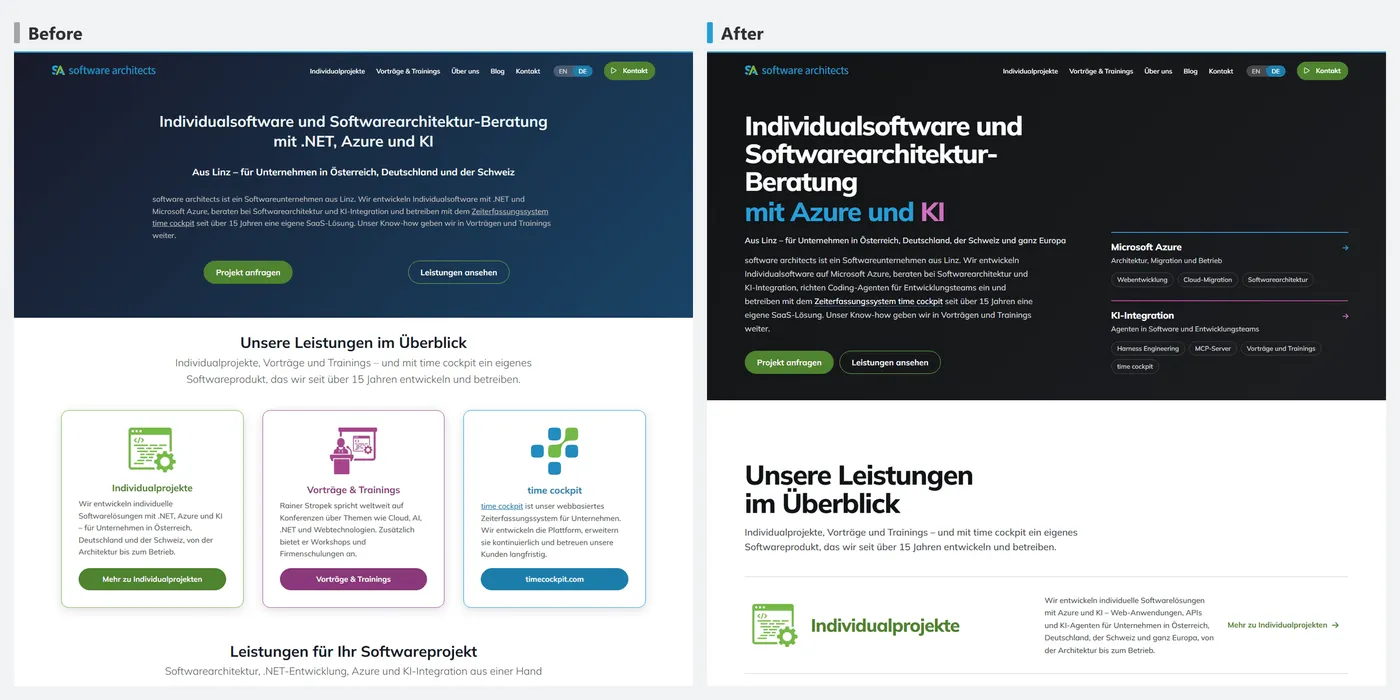
Between 27 September and 12 October we reworked four user interfaces with the agent skill impeccable in Claude Code:
- timecockpit.com: Astro, MDX, Bootstrap SCSS
- software-architects.com: Astro, MDX, Bootstrap SCSS
- the time sheet calendar of the time cockpit Angular web app
- time cockpit sidekick: an Electron app that collects local work signals (active windows, Git, file changes, AI sessions)
We worked with the Claude Opus 5.5 model, and in some of the sessions on timecockpit.com and time cockpit also with Claude Fable 5.1. No designer was involved.
impeccable adds design knowledge to the agent, plus commands such as critique (a scored review), generate (variants of an element) and polish (a finishing pass). How the skill is built is described further down. This article shows the workflow and the results first, then the limits. We wrote most prompts in German. They are translated as literally as possible; prompts we wrote in English are quoted verbatim. The screenshots show the German pages.
The workflow
Almost every change followed the same pattern.
critiqueof the current state.- The timecockpit.com home page scored 21 of 36 points. Findings: a generic SaaS template, the main promise appears six times, the hero shows no product.
- The footer scored 24 of 40 points: 45 equally weighted links and 1,720 px tall on a phone.
- Create variants, usually with
/impeccable generate 3 drafts for <area>. - Choose. The feedback is usually a number plus a correction:
- “Take 2a”
- “take variant 2 but in colour”
- for seven feature pages at once: “A, B, C, A, A, A, A”
- Build it in, then
polish. In our sessions,polishpicked up the open priorities of the latest critique. Then came screenshots at 390, 768, 1024 and 1440 px, and after larger changes a newcritique.
timecockpit.com
Home page hero
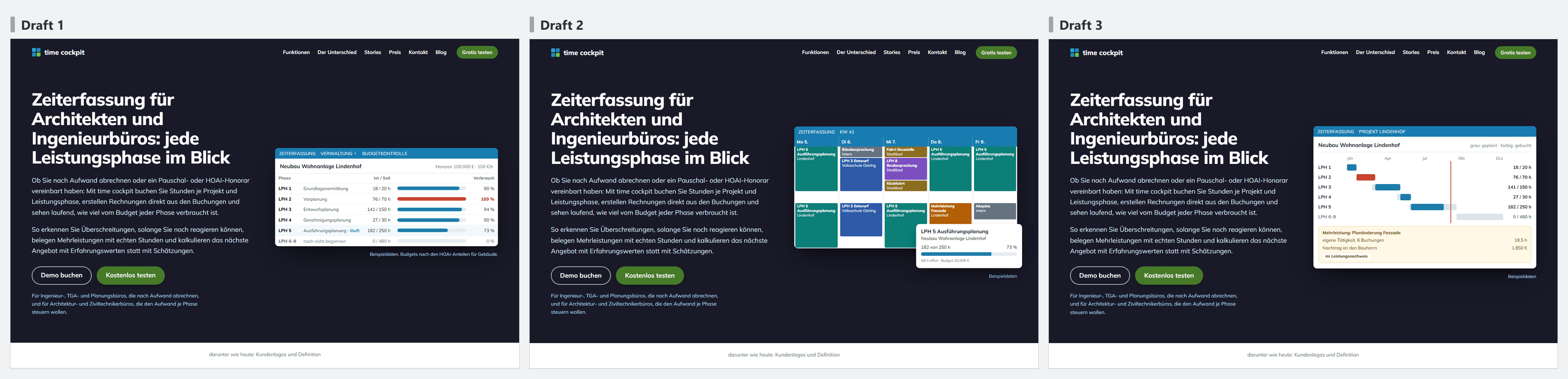
The hero went through three stages. On 29 September it was text only; the critique pointed out that it showed no product. In response, a real screenshot of the calendar went next to the heading, but on a phone it was unreadable. impeccable then went through sketch variants. This prompt finally produced a dedicated SVG component with demo data (translated):
/impeccable generate 3 versions of a simplified product graphic as a vector graphic. same structure and real data, but with fewer details, larger type and in the brand colours. On a phone it stays readable, which the real screenshot doesn’t manage, and it looks calmer than the sketches.
Feature pages
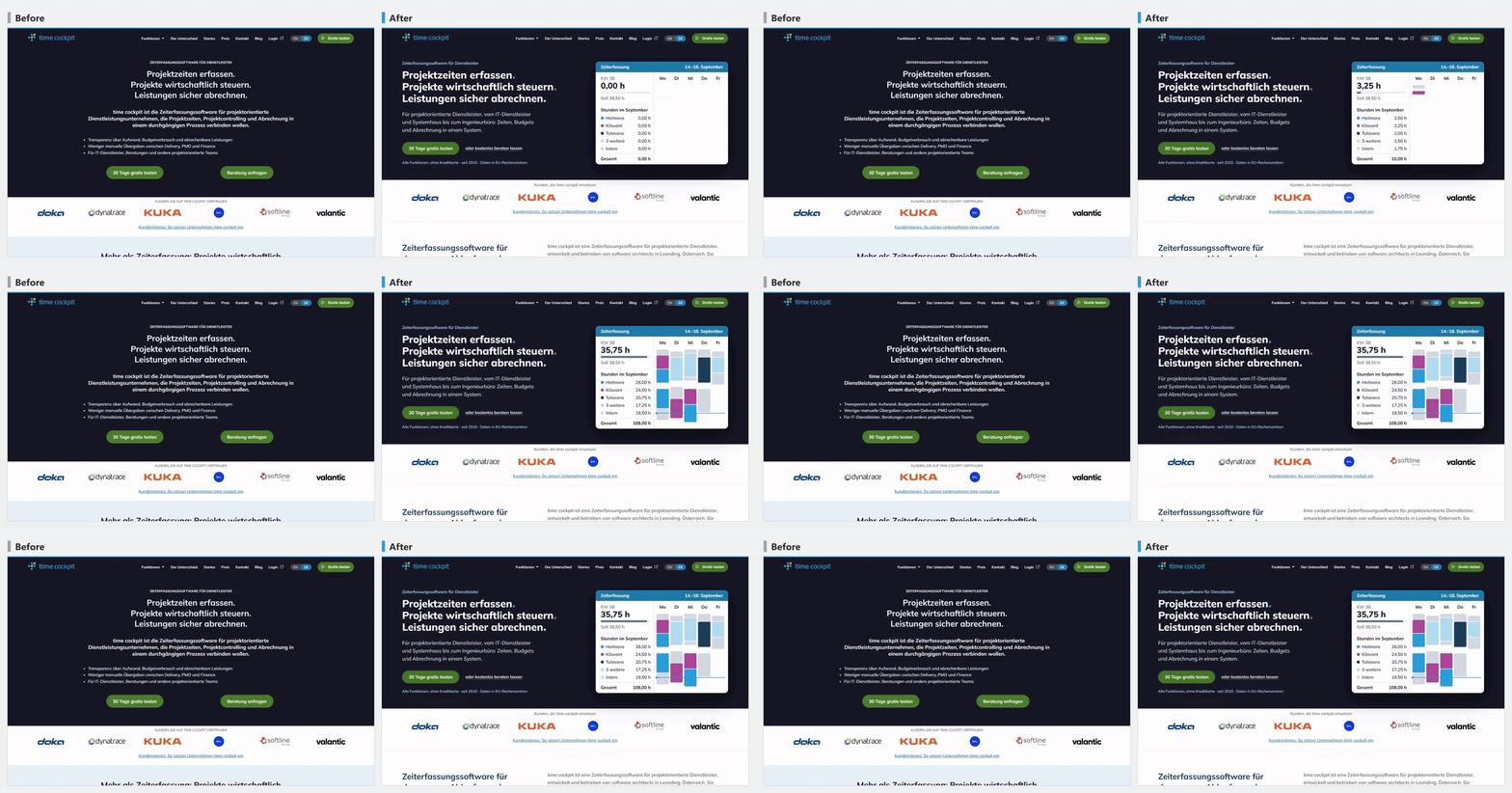
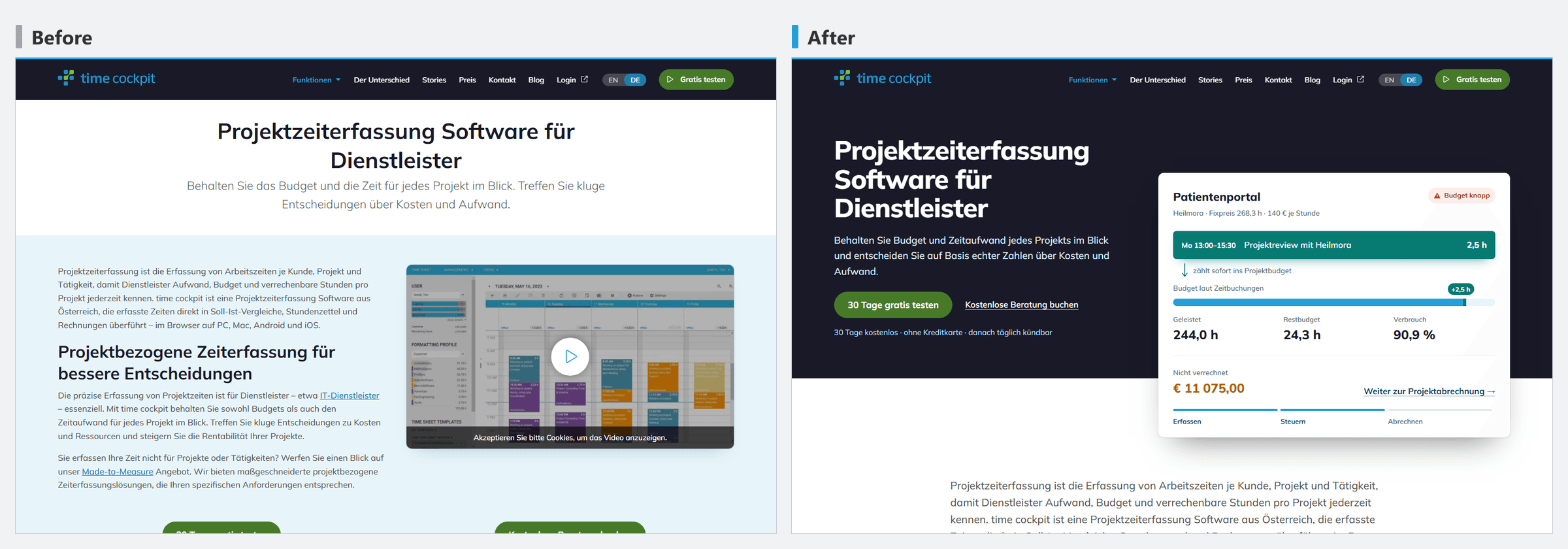
The texts of the feature pages were already optimised for search. To keep them unchanged, we stated that explicitly in every prompt (translated):
/impeccable generate 3 drafts for a hero area of a feature page. Take /de/mcp-server-ki-assistenten/ as an example. The texts are already SEO-optimised and must not be changed any more. Graphics may well be changed.
Pricing page
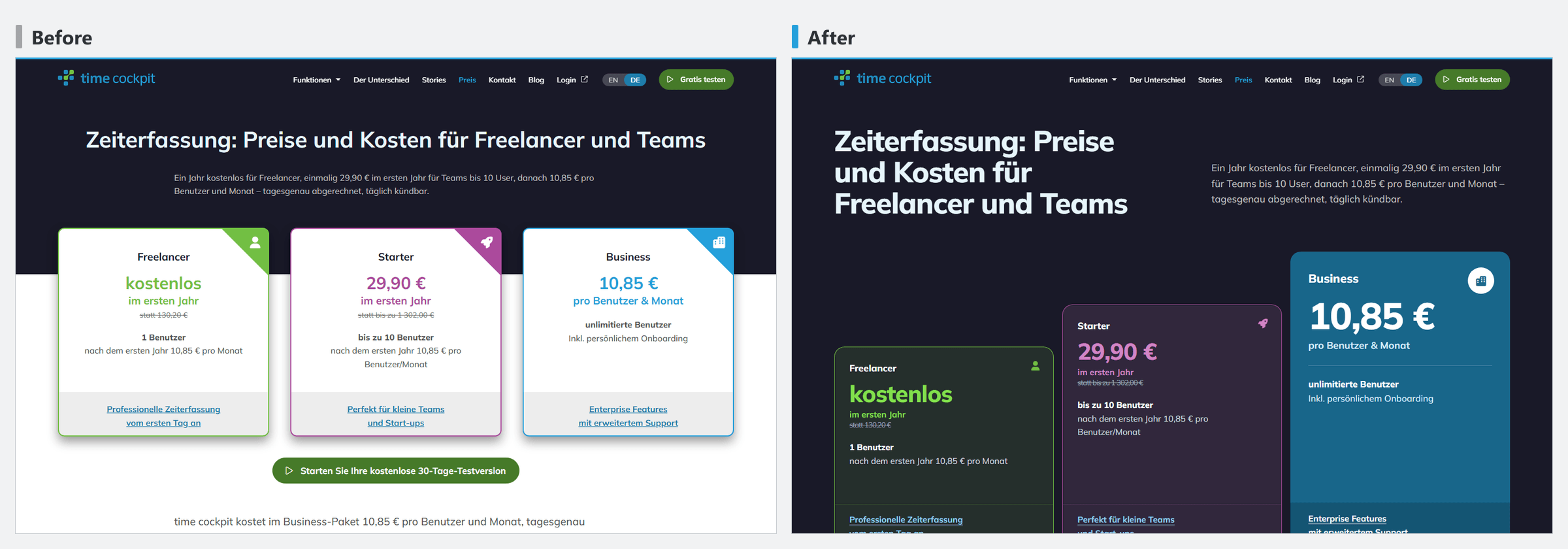
The pricing page shows how to keep working on one variant. The first prompt covered three areas (translated):
/impeccable generate 3 proposals for the hero area, the price tiles and the features table on /de/preis/
We liked the dark background of variant C, but not yet its tiles. The second prompt built on it (translated):
/impeccable generate 3 more proposals only for the price tiles on a dark background as in C
Mobile menu
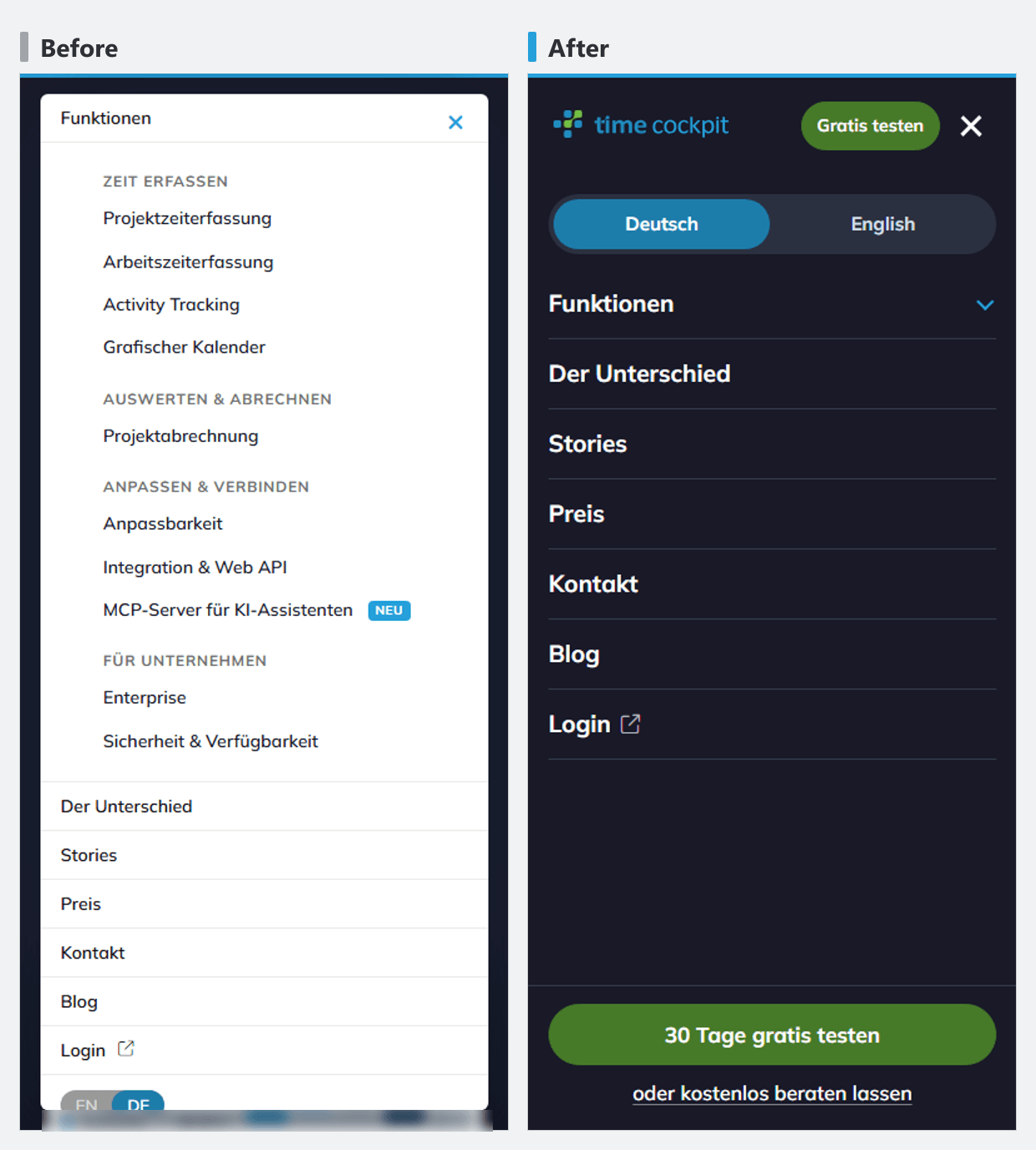
Here the prompt started from a concrete bug (translated):
/impeccable generate 3 drafts for the menu in the mobile view. At the moment it’s hard to switch the language because the cookie icon covers the buttons. And scrolling only works sometimes.
Rules and scores
Rules we had to correct more than once we wrote down once in general terms. An example (translated): “If the section before or after also has a coloured background, there should be no white strip between them.”
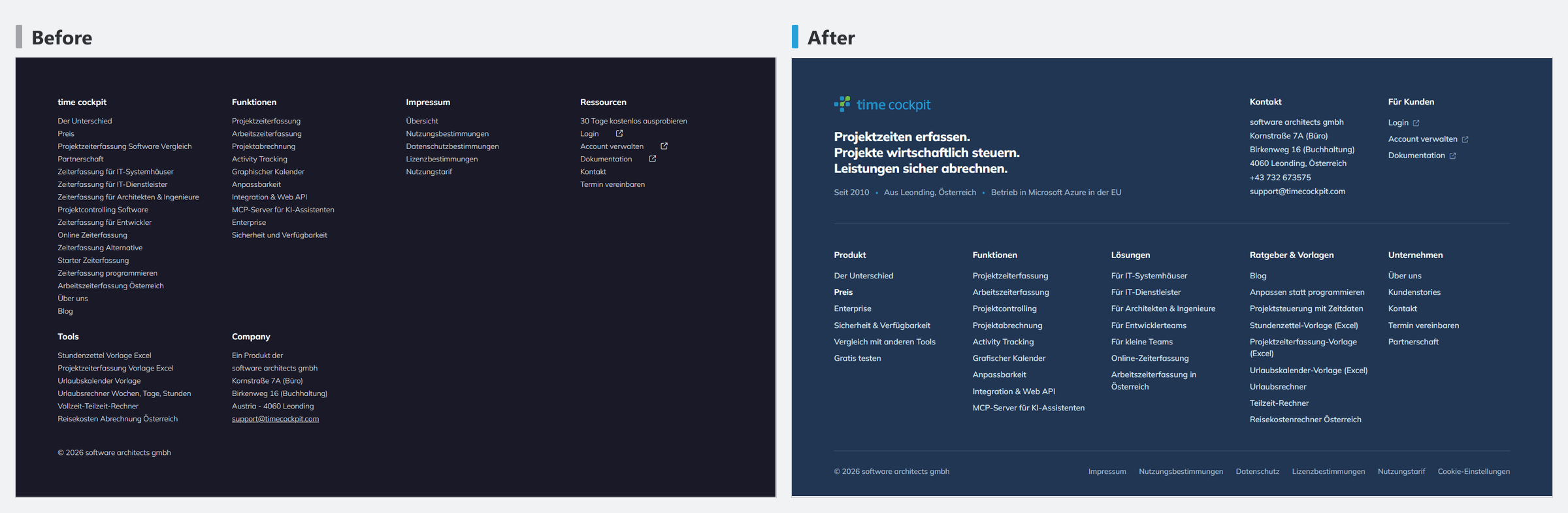
The critique scores after the rework:
| Area | Before | After |
|---|---|---|
| Footer | 24/40 | 27/40 |
| Contact area at the end of the page | 17/32 | 23/32 |
| Home page hero | 64 % | 71 % |
How the scores come about:
critiquerates usability against Nielsen’s ten heuristics, with 0 to 4 points each.- Heuristics that don’t apply to a page count as n/a. That’s why the maximums differ (40, 36, 32 …).
- On top of that come a design review and automated checks with the detector and in the browser.
The model assigns the scores. They are useful for prioritising and for comparing the same area before and after, not as an objective measurement.
software-architects.com
About 27 hours passed between the first and the last prompt (7 October, 15:35, to 8 October, 19:00, Central European Summer Time). The sessions were active for about nine to ten hours of that, with roughly 100 prompts. We measured this from the session logs, counting stretches without a pause longer than 15 minutes. How much of it was the agent running and how much was our own work cannot be separated cleanly from the logs.
Palette
It started with a stock-take (translated): /impeccable what is the current colour scheme?. The answer was followed by the actual brief (translated):
we keep primary, secondary and tertiary, but I’d like the surfaces in shades of grey, almost black for header and footer, make me a palette for that
impeccable proposed a palette and also pointed out contrast problems of the brand colours that already existed: the primary blue #25a0da reaches only 2.95:1 on white, the green #72bf44 2.3:1, the violet 3.8:1 on a dark background. The corrections would have changed where and how the brand colours are used, for example links in the darker blue. Because we wanted to leave the brand colours unchanged in this step, we implemented only the palette (“yes, implement it excluding the contrast corrections”, translated):
- Primary, secondary and tertiary colours stay.
- Surfaces become a neutral grey scale.
- Header and footer become almost black.
Afterwards we checked the appearance in the browser, not the contrast. The contrast problems of the brand colours have not been fixed yet; they are listed under “What we will change next”.
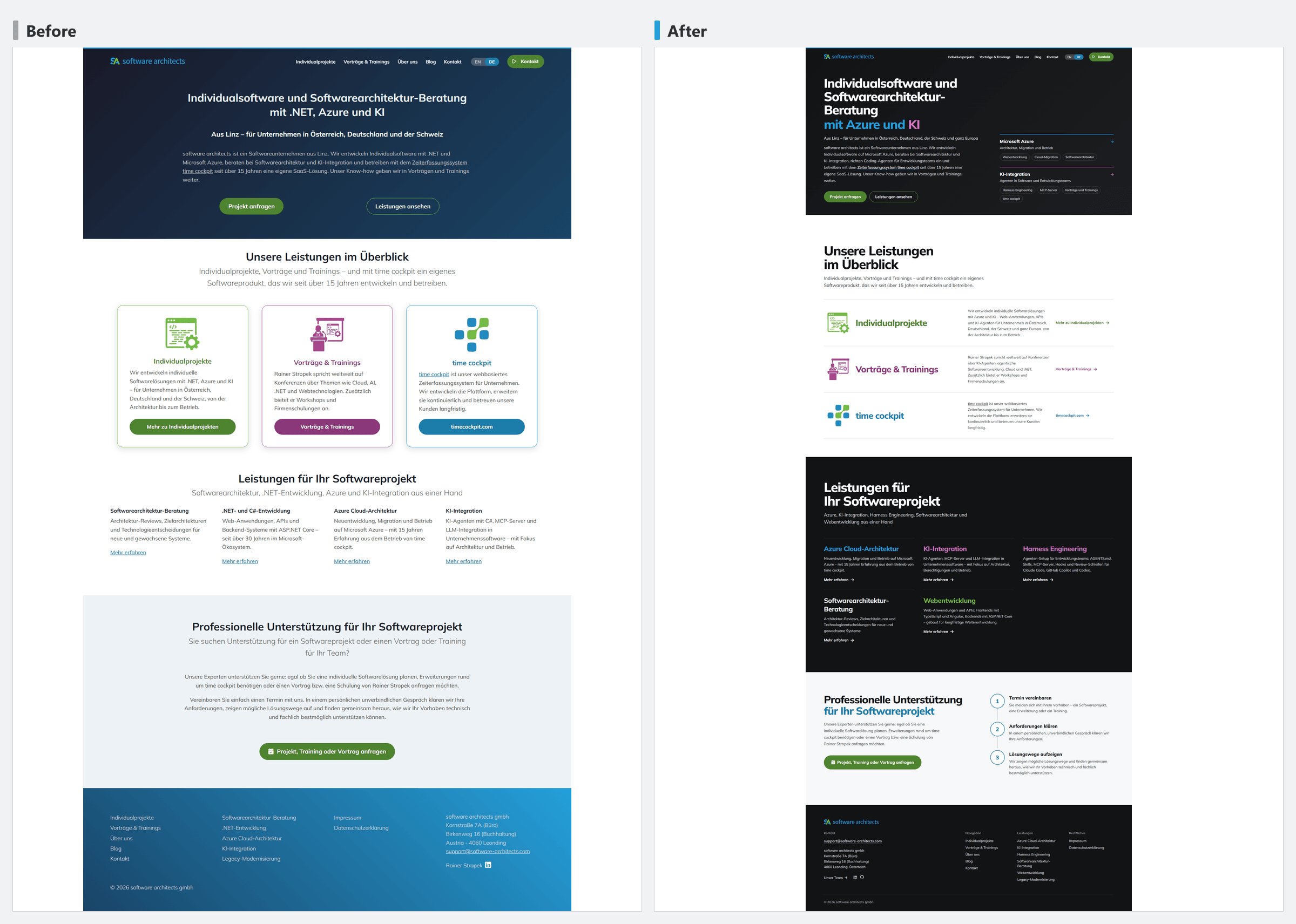
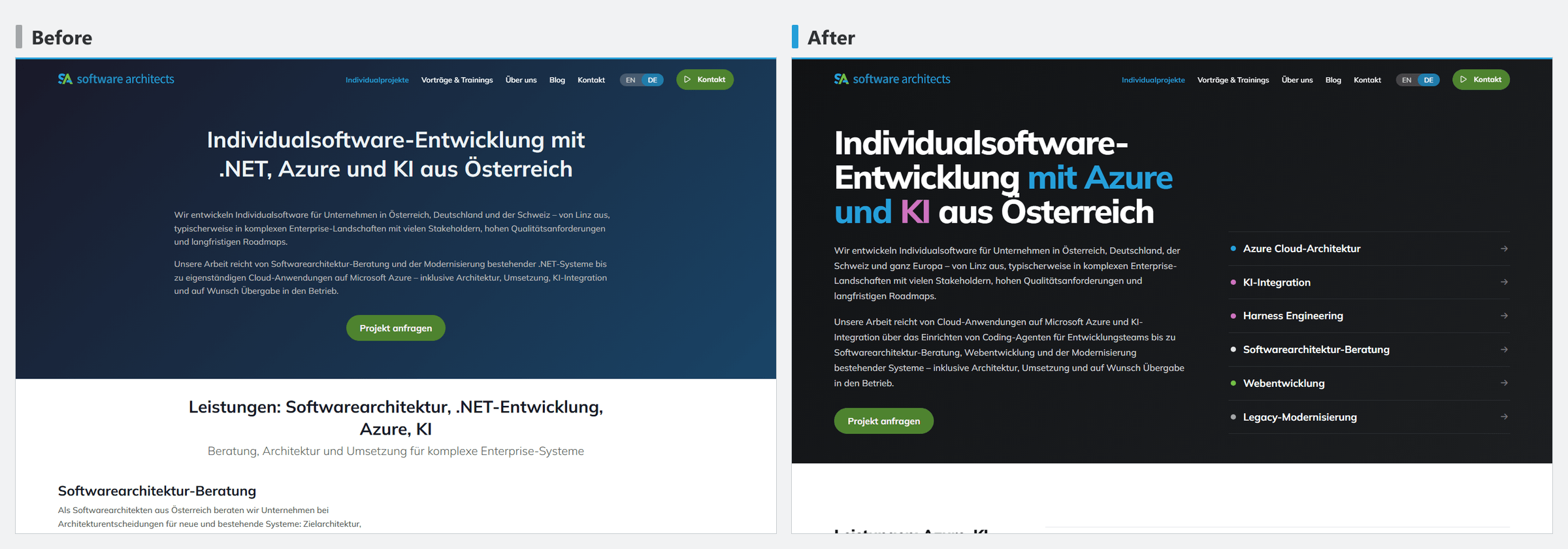
Home page hero
It took three rounds:
- The first drafts put .NET at the centre.
- After the prompt “don’t put .NET so much in the foreground, we do other things too, Azure and AI are more important” (translated), an
overdrivevariant appeared with Azure and AI as orbits. - The next day we replaced it with a two-column hero (“without the circles, a bit less tall”, translated).
The other pages
The remaining pages ran in Live Mode, steered with a single sentence per page (translated): “Now do the same for /de/vortraege-und-trainings/ - impeccable for every block.” Of 34 Live Mode sessions we accepted 22 and discarded 12.
On the custom projects page we dropped the illustrations (“Take 1, but we won’t use the graphics any more. Should we make new bolder graphics, or can we bring more colour in through the text?”, translated). The colour now sits in the type, plus a jump list to the services.
One problem: accepting a variant with a click did not work for MDX pages. Claude then transferred the chosen variant to the MDX file by hand.
The stylesheet
The central file _user.scss grew from 1,358 to 5,089 lines in these 27 hours. The growth consists almost entirely of new sections for individual pages and blocks: 21 commits added 4,171 lines and removed 440. Only two commits removed more lines than they added: replacing the orbit hero and the quieter footer.
That was to be expected in so far as every block got its own layout. A systematic review for duplicate rules, unused selectors and overrides has not happened yet, though. It is on our list of next steps.
Mobile menu
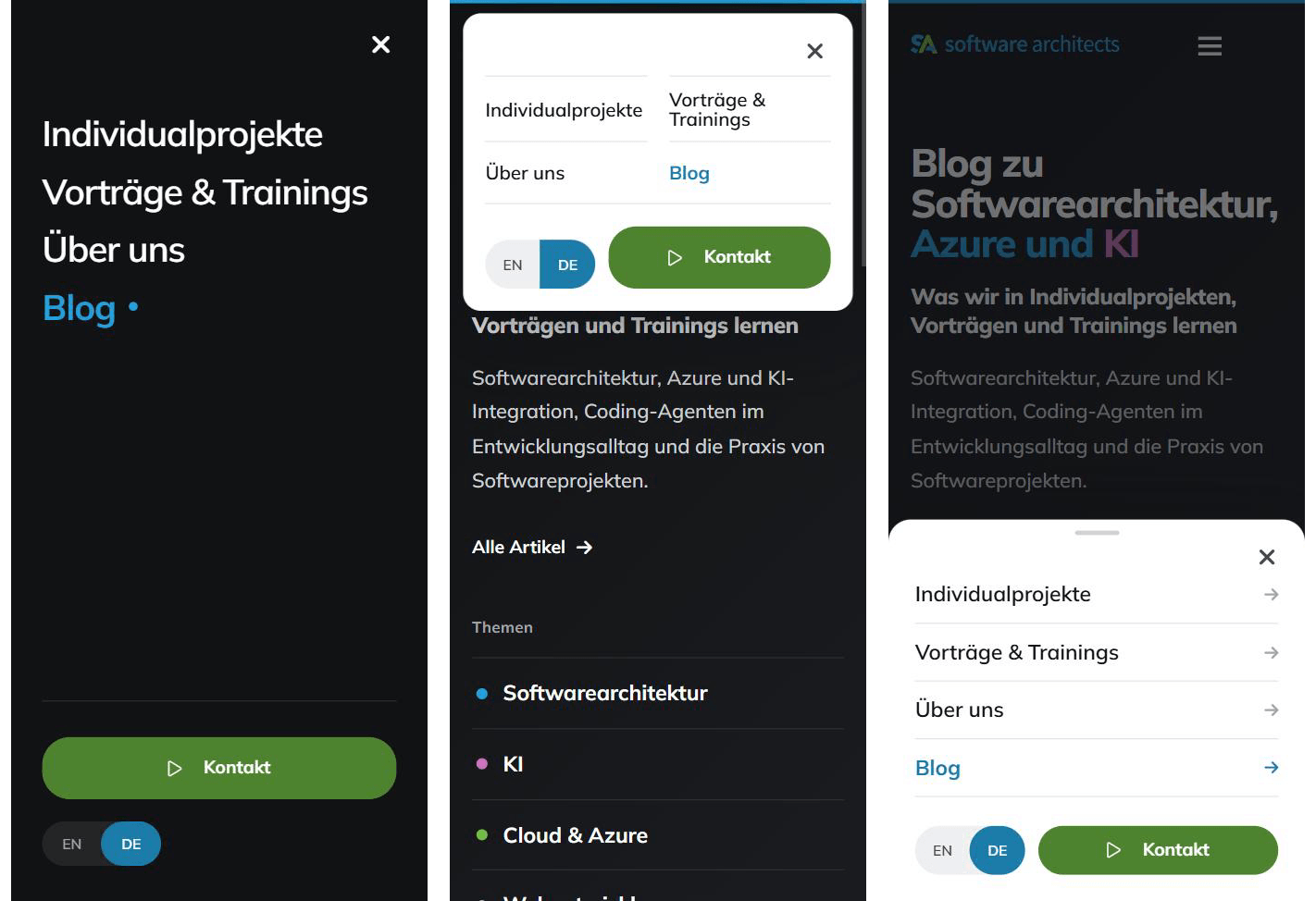
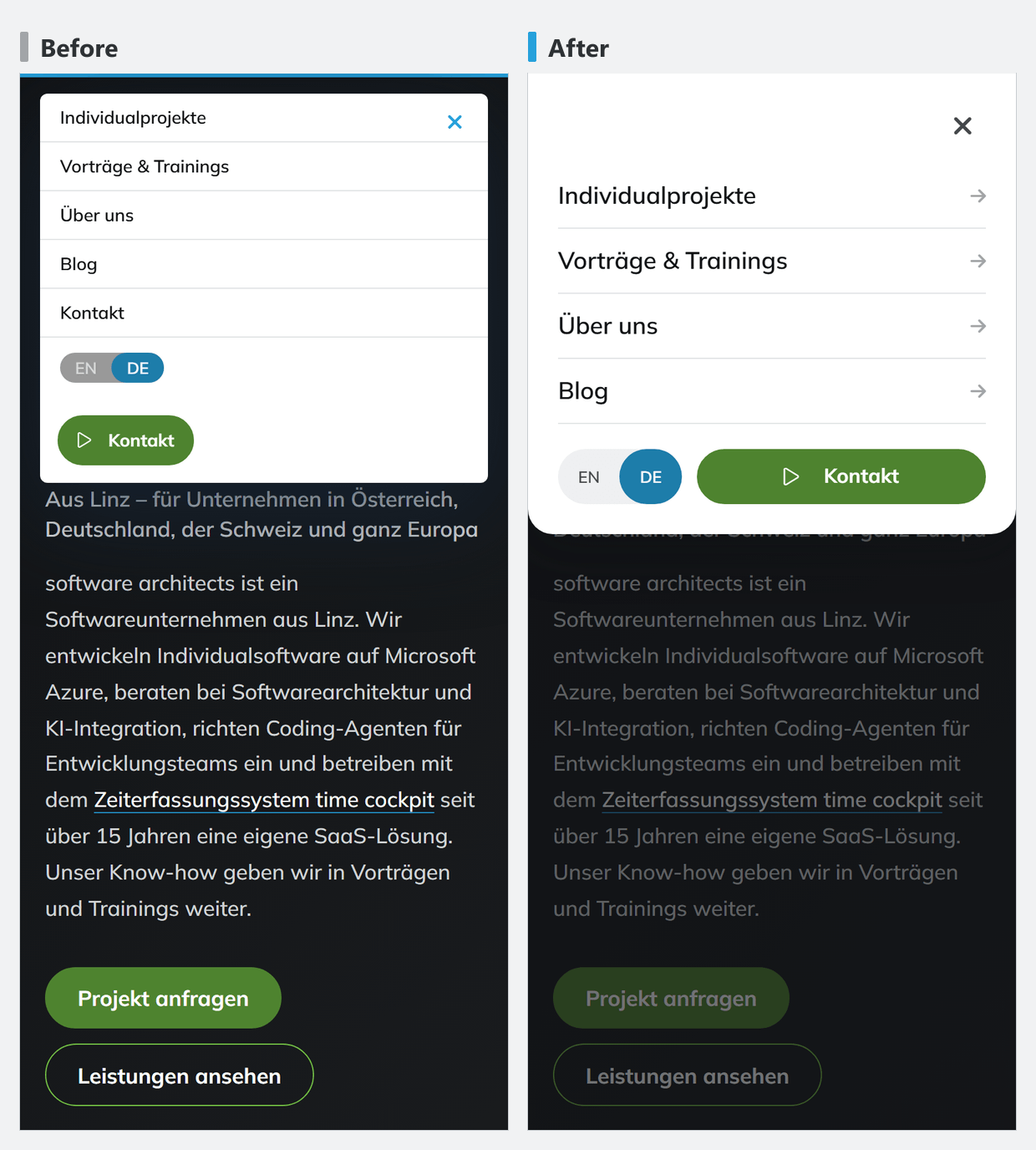
The mobile menu shows the workflow in miniature. Prompt (translated): /impeccable generate proposals for the mobile menu. The choice came with a correction (translated): “take variant 3, but show it at the top because the burger menu is at the top too”.
time cockpit sidekick
At the end of September, sidekick was a prototype for developers:
- tabs at the top, a “TEST” badge
- version, API URL and temp path in the header
- nine equally weighted settings cards
The first critique of settings and pairing scored 19 of 40 points. impeccable rates findings on four levels, P0 to P3; the model assigns the level. P0 means the task cannot be completed at all, P1 means it is made considerably harder and should be fixed before a release. The P1 findings were functional:
- Changes were lost when switching tabs.
- Pairing never completed.
- Contrast only 3.2:1.
We fixed the first two in the code, not just in the presentation:
- Settings keep unsaved changes per area and mark them with a coloured dot.
- Pairing is now a three-step flow with a status line until the calendar reads for the first time. The access log sits next to it in full sentences instead of a technical list.
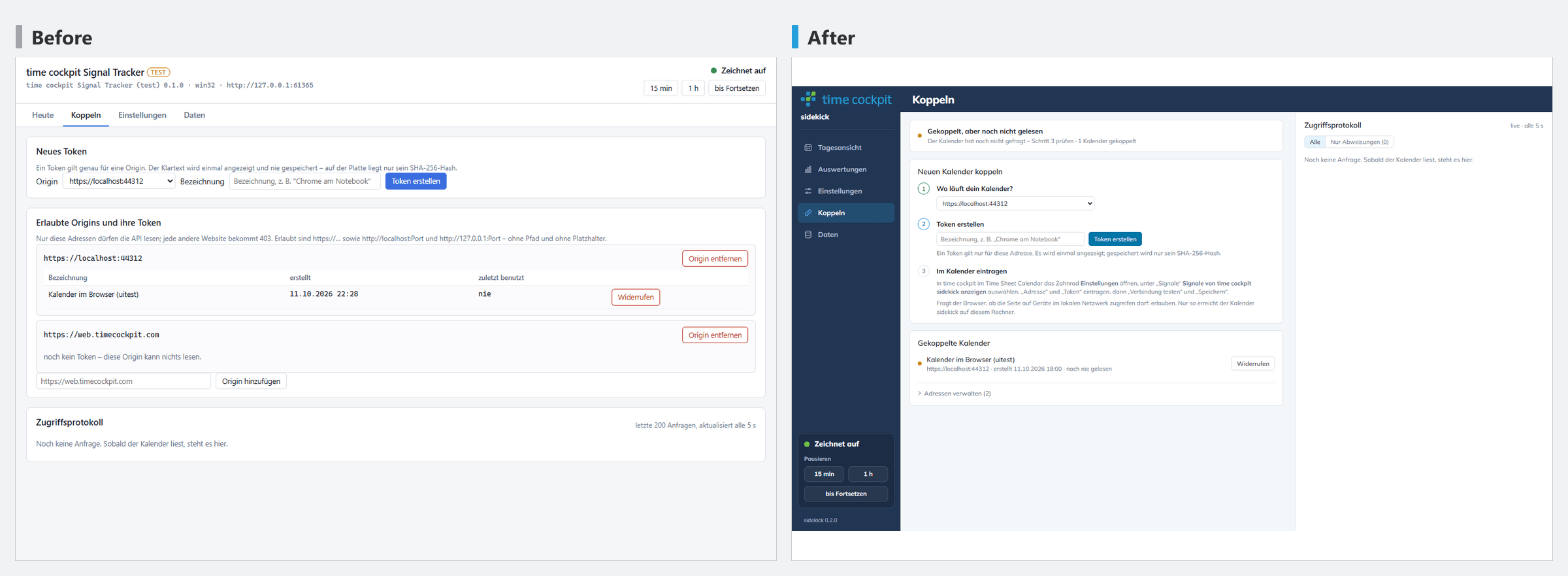
The shell (navigation and frame around the content) came out of two prompts (translated):
/impeccable generate 3 proposals for the general look & feel of the Signal Tracker to match https://www.timecockpit.com. $primary: #25a0da;$secondary: #72bf44;$tertiary: #ab4a9c; This is not yet about the details inside the tabs but about the shell around them.
/impeccable generate 3 variants of the shell in which the menu on the left and the area on the right look more unified. Because of the grey on the right it looks as if it were a different window from the dark blue area.
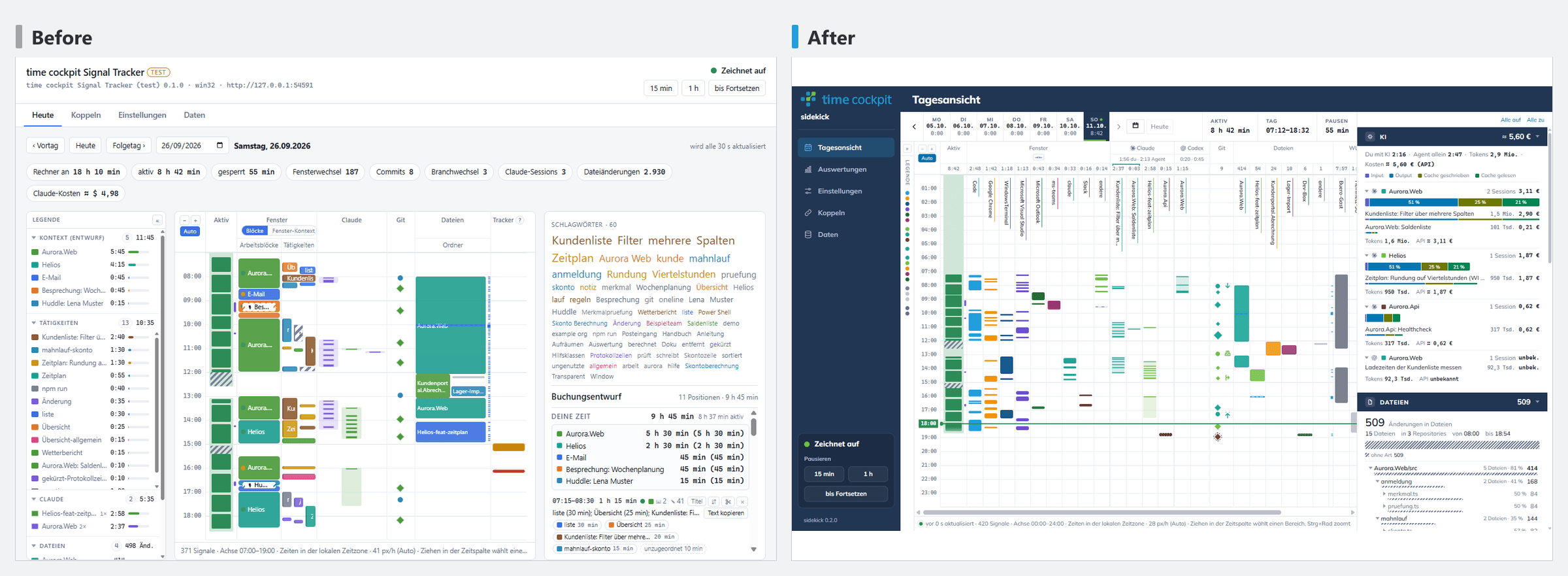
Later prompts became more specific, for example (translated): “The signal details should span the full height and end flush on the right. Can we avoid the boxes with rounded corners?”
Before the download was released, another critique ran across all parts of the app on 11 October: 27 of 40 points. Its four P0 findings were no longer about looks. Status on 13 October:
| P0 finding | Status |
|---|---|
| Deleting did not cover the backup copies. | fixed on 12 October |
| The default window size cut off the day view. | fixed on 12 October (wider first window) |
| The first day was empty, with no hint at the next step. | fixed |
| There was no way from the calendar to sidekick. | fixed |
The four P1 findings of this critique have also been fixed since 12 October: developer texts in front of end users, fine-tuning settings that were always open, no hint when closing the window, and a token that disappeared on a tab switch.
Angular app
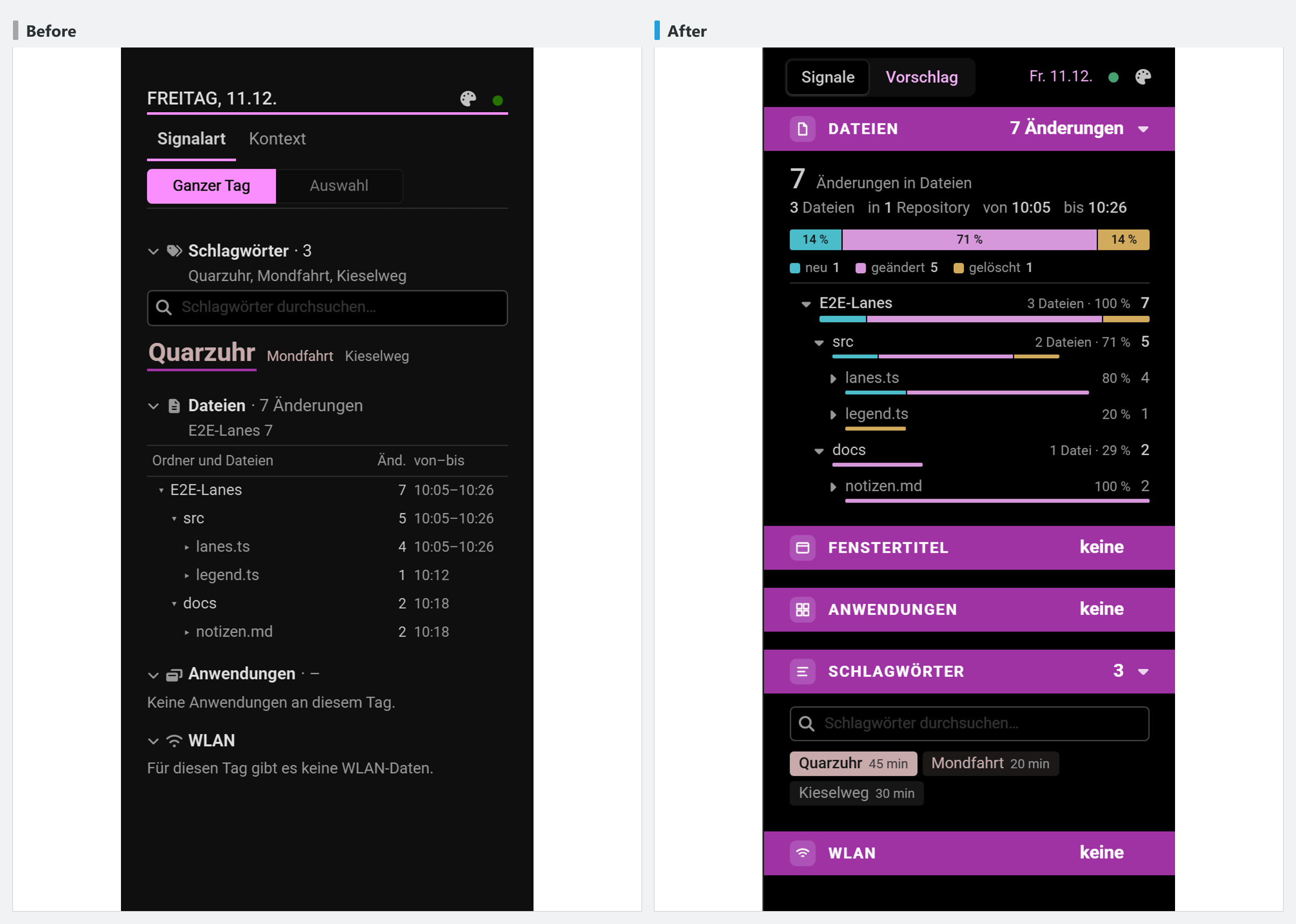
The time sheet calendar shows the same signals as sidekick. Once sidekick was reworked, the Angular app was to adopt the same visual language without losing its own theme (translated):
/impeccable generate drafts for the signal detail column in the Angular app. The section headings such as AI and Files should be similar to sidekick. Let’s try a white background with lines on the left as in sidekick for the lane. But it should still fit the design of the Angular app.
Here we explicitly asked for elements from another app; the last sentence limits how much of it gets taken over. What was taken over: the bands, the collapsible rows and the column heads from sidekick. Colours, type and spacing stayed those of the Angular app; the accent colour still comes from each tenant.
How impeccable works, technically
impeccable is an agent skill by Paul Bakaus (source on GitHub, docs at impeccable.style/docs). You install it with npx impeccable install and update it with npx impeccable update. This section refers to version 4.3.1, which we have installed, and to the online docs as of October 2026.
The skill has three parts:
SKILL.mdand reference files: one reference file per command underreference/. Claude only loads the file of the command it runs, for examplecritique.mdorpolish.md.- A small binary (
scripts/impeccable): it loads the project context at the start (see below). - A detector hook: it runs after every change to UI files and reports anti-patterns, such as low contrast, too little padding or all caps in body text. In Claude Code it is registered in
.claude/settings.local.json, so it only applies on your own machine. The agent records exceptions for single values, with a reason, in.impeccable/config.json.
The docs group the commands like this:
| Group | Commands |
|---|---|
| Create | shape plans an area as a brief before any code is written. /impeccable with a free description chooses the approach itself; without an argument it suggests next steps. |
| Evaluate | critique (design review with scores), audit (accessibility, performance, responsiveness) |
| Refine, Simplify, Harden | for example polish, bolder, quieter, layout, typeset, delight, overdrive, distill, clarify, adapt, harden |
| System | init, document, extract, generate, live |
Context files
How well the results fit the project depends on the context. According to the docs it lives in three places:
| File | Created by | Content |
|---|---|---|
PRODUCT.md | init | Audience, goals, platform, constraints, terminology. init deliberately does not ask about colours or fonts. |
DESIGN.md | document | Colours, typography, components and design rules of the existing interface, with the tokens machine-readable in the frontmatter |
.impeccable/surfaces/*.md | Work on a page | Purpose and chosen direction of a single page |
Ours is incomplete. timecockpit.com and sidekick have a PRODUCT.md, software-architects.com has no context file, and there is no DESIGN.md anywhere. The design rules of timecockpit.com live in .impeccable/design.json, for example “Green Means Go” (exactly one green action per band) and “Lift the Evidence” (shadows only for real content such as screenshots and portraits). According to the docs, however, design.json is generated metadata that document writes next to DESIGN.md and that you don’t edit by hand.
Variants: generate and live
generate and live create variants of an element directly in the running page. According to the docs, Live Mode is still in beta. You cycle through the variants and keep one in your source code with “Accept”.
generate: you name the element, the direction and the count in the chat, for example/impeccable generate 3 bold variants of the pricing cards. You can ask for 1 to 8 variants; without a number you get three.live: you pick the element yourself in the browser and can add comments or drawn strokes.
Variants keep the existing design of the interface they belong to. If you want to depart from it, you have to ask for a redesign explicitly. There is no separate command for that: you write it as a free request to /impeccable, as in the docs’ example /impeccable redesign the marketing site. Keep the product facts and signup flow, but replace the current visual style. That starts a separate flow with a choice of direction and, if image generation is available, mockups before code.
generate was our most common entry point: 93 of the 114 calls on timecockpit.com. There, however, the variants mostly did not appear in the page but as HTML draft files with Playwright screenshots for desktop and phone. On software-architects.com everything ran in Live Mode. That accepting with a click failed for MDX matches a note in the docs: for pages generated from another file, the change has to reach the actual source.
Limits
- Logo: for software-architects.com, three refinements of the existing logo and three new concepts came out. We adopted none of them.
- Balance bars: in the Angular calendar we built one of five variants and rolled it back again.
- Content questions: questions like “Will this scare off smaller customers?” are not something the skill answers reliably. What impeccable knows about audience and positioning comes from
PRODUCT.md. That is no substitute for market knowledge. - Numbers in generated graphics: a
critiquefound hours in the timecockpit.com hero that did not add up. impeccable had drawn that graphic itself. Check the numbers in generated SVGs. - Rules only in the prompt: we stated the rule “no white strip between coloured bands” only in the chat, not in a context file. impeccable won’t know it in the next session.
- Live Mode and MDX: Live Mode is in beta. Accepting a variant with a click did not work for MDX pages.
What held up
We did these things ourselves, and they worked:
- Variants instead of one solution. Three drafts side by side clarify what we want faster than a long description. If needed, you keep working on one variant, as with the price tiles.
- Answer briefly and specifically. A number plus a correction is enough, for example “Take 2 without the blue lines above the headings” (translated).
- Name the element and the direction. A URL or CSS class plus a direction, for example “5 bold versions of the menu bar, keep the dark background”.
- Say what must stay, for example “without changing the text”, “no white strip”, “not pastel”, “without the circles”.
- First
critique, thenpolish. The critique gives the order, and in our sessionspolishpicked up its open priorities. - Check in bounded passes. Playwright screenshots at 390, 768, 1024 and 1440 px after every rework. The docs recommend the same measure: desktop and phone in one pass, fix everything at once, at most one more round.
What we will change next
So far we have only partly followed these recommendations from the docs:
- Set up the context files completely.
initfor aPRODUCT.mdon software-architects.com,documentfor aDESIGN.mdin every project./impeccable doctorfinds outdated context and broken hooks. - Write recurring corrections into the context files instead of the prompt: design rules into
DESIGN.md, a page’s purpose and direction into.impeccable/surfaces/. - Set up the detector hook for the team. Either every team member turns it on with
/impeccable hooks on, or it goes into the shared.claude/settings.json. - Run
auditbefore publishing, for accessibility, performance and responsive behaviour. We hardly used it. - Fix the contrast of the brand colours on software-architects.com, above all primary blue and green as text on white.
- Review the software-architects.com stylesheet for duplicate rules and overrides.
Conclusion
Three things held up for us: variants to compare instead of a single solution, brief and specific feedback, and screenshots at every width as a check. We only partly set up the context files that impeccable provides for. They are our next improvement, so that rules don’t have to be restated in every prompt and still apply in the next session.
Context, skills, hooks, and tests and review loops are the building blocks we set up as harness engineering for development teams that use coding agents such as Claude Code, GitHub Copilot or OpenAI Codex in their own codebase.
